Home Assistant Configuration
Document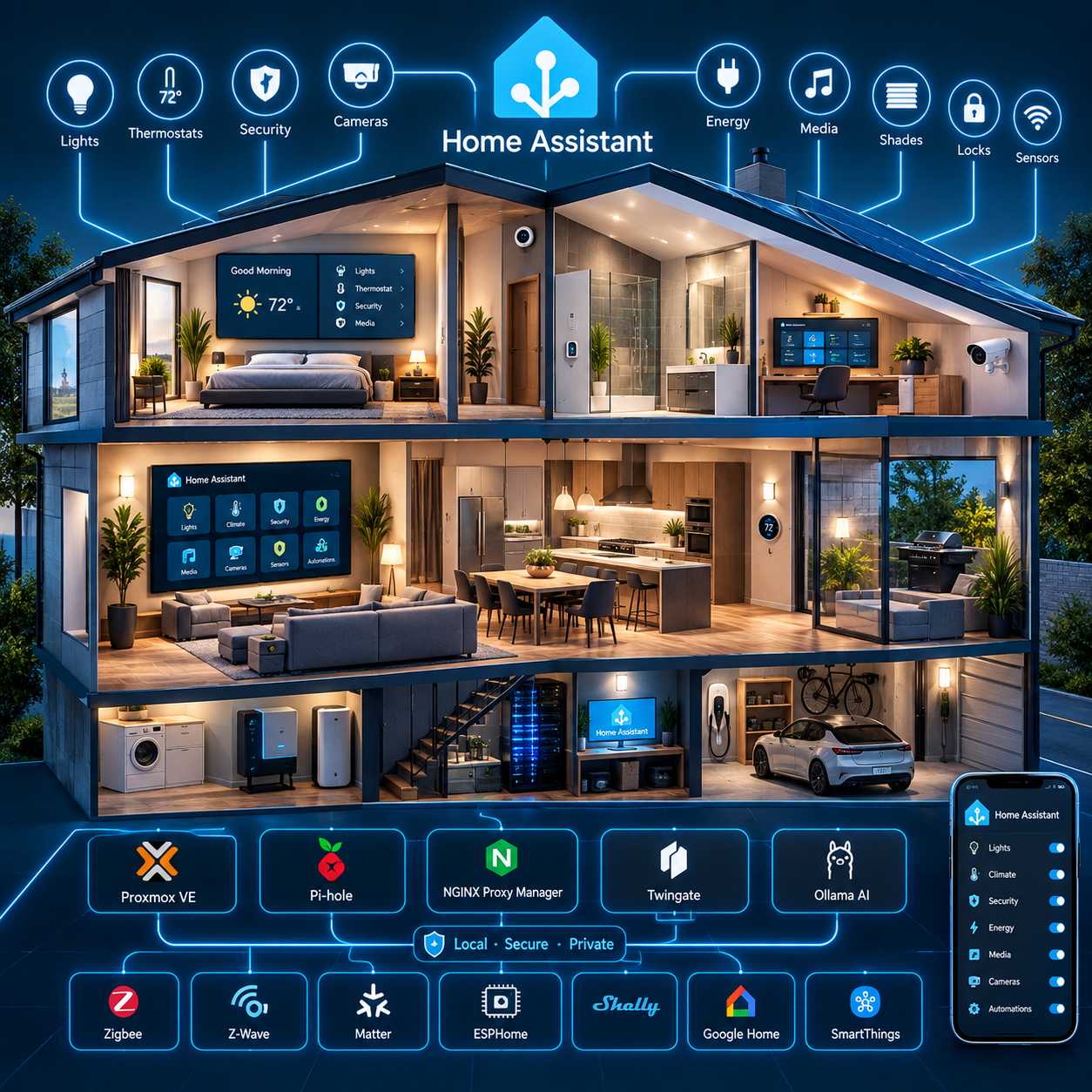
: A Home Assistant Smart Home Integration
Purpose
This document defines the initial configuration that provides the foundation for the sub level web pages (desktops) surrounding the Home Assistant installation.
The Home Assistant installation is implemented as a Home Assistant OS (HAOS) virtual machine hosted on the Home Lab Compute Module running Proxmox VE 9.2.3.
Home Assistant is intended to serve as the central home-automation platform and, over time, the primary local voice-assistant platform.
The architectural strategy is local-first and cloud-minimized. Services and integrations should operate locally whenever practical. Cloud services remain permitted where they provide required functionality, device compatibility, ecosystem integration, or capabilities that cannot reasonably be reproduced locally.
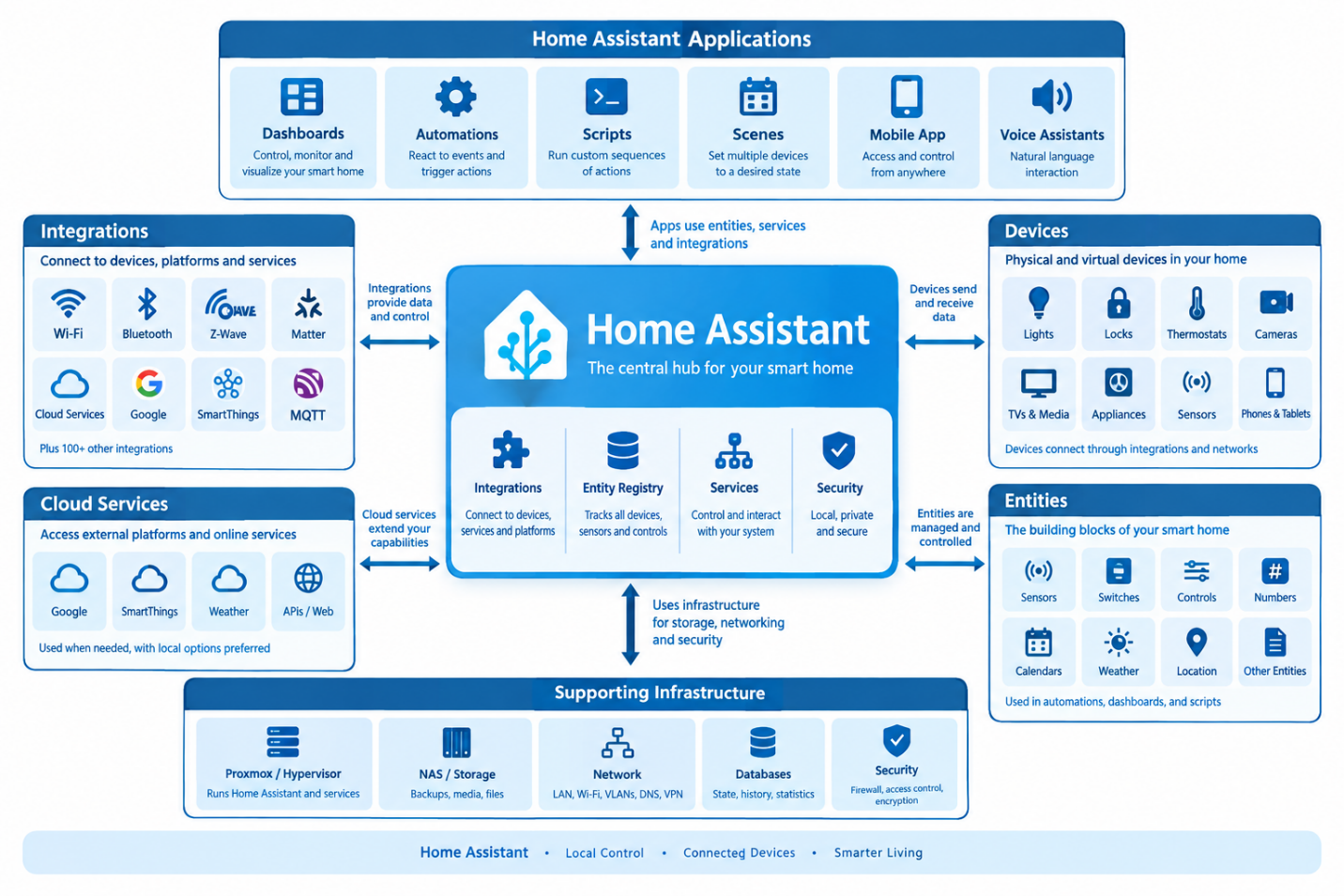
Figure 1: Home Assistant Smart Home Relationships
Relationship to the Infotainment Module
Home Assistant is hosted on the Compute Module, while centralized persistent storage and backup services are hosted on the separate Infotainment Module.
The Infotainment Module runs its own Proxmox VE 9.2.3 environment and provides centralized storage through Samba-NAS LXC 100. It also hosts media, document, photo, database, download, and other application services.
This creates a two-node system architecture:
Compute Module (This module)
Home automation, AI, voice, DNS, reverse proxy, and remote-access services.
Infotainment Module
Centralized storage, media, documents, photos, databases, backups, and supporting applications.
The configuration is defined by establishing a foundation then by applying categories of devices into a common desktop. This document establishes this foundation and will consist of setting up Areas Labels and Zones, Cloud Services, Voice Services, People, Networks, Specific Home Details, System Logs, Backups, Entity ID's, AI Tasks, Development Labs, System Storage.
HACs provides addon tools and cards and will be discussed in this document as an initial configuration, but the full HACs configuration will be discussed during each individual Dashboards as they are implemented.
The overall recommended system ecosystem will be discussed, and we will explain how to install and configure this base Eco-system. This includes the various tools used to manage Home Assistant and how these tools integrate within the system.
Architectural Design Goals
The Home Assistant architecture has the following primary goals:
Foundation
Areas, Labels and Zones
Home Assistant uses Areas, Labels, and Zones to organize devices, entities, and physical locations within your smart home. Areas represent specific rooms or spaces, Labels provide flexible ways to categorize and group items, and Zones define geographic locations such as home, work, or other places. Together, they provide the organizational foundation used by dashboards, automations, scripts, and voice commands.
In our home we have the Areas broken down as follows:
Master Bedroom 1
Contains 1 Fan, 3 smart Color Lights, 1 Smart Color Reading Light, 2 Outlets (Candle, Floorlamp), and a Color Accent Light String
In addition, the fan (z-wave) and 1 additional light are powered via wall switches
3 window shock sensors, 1 Nvidia Multimedia Controller, 1 Vizio TV
Playroom Bedroom 3
Contains 1 Fan, 3 smart Color Lights, 1 Color Accent Light String
In addition, the fan (z-wave) and 1 additional light are powered via wall switches
3 window shock sensors, 1 Vizio TV
Office Bedroom 2
Contains 1 Fan, 3 smart Color Lights, 1 Color Accent Light String
In addition, the fan (z-wave) and 1 additional light is powered only via wall switches
3 window shock sensors, 1 Vizio TV
Diningroom
Contains 1 Color Accent Light String
In addition, 1 additional light is powered only via wall switches
2 window shock sensors, Door Shock Sensor
1 Surveillance Camera
Greatroom
Contains 1 Fan, 2 smart Color Lights, 1 Color Accent Light String
In addition, the fan (z-wave) and 2 additional lights are powered only via wall switches
3 window shock sensors, 1 Motion Detector, 1 Nvidia Multimedia Controller, 1 Vizio TV
1 Dennon Surround Sound System, 1 Apple TV
Kitchen
Contains 3 smart Color Lights, 1 Color Accent Light String
In addition, 2 additional lights are powered via wall switches
Entranceway
Thermostat, wall panel, DSC Security Panel
In addition, 2 additional lights are powered via wall switches
1 window shock sensors, 1 Magnetic Door Sensor
Cloud Services
Cloud Services provide Home Assistant with access to external platforms and services that cannot be operated entirely locally. These integrations can connect Home Assistant to vendor cloud accounts, remote services, online APIs, and other internet-based functionality. Where possible, a local alternative can be used to reduce cloud dependency while still allowing cloud services when they provide important functionality.
Voice Services
Voice Services allow Home Assistant to become a natural voice-controlled interface for the smart home. Voice functionality can be used to control devices, execute commands, retrieve information, and interact with Home Assistant using natural language. Voice services can be provided locally or through external platforms, depending on the desired balance between privacy, capability, and convenience.
People
The People system allows Home Assistant to associate users with their devices, presence information, and home location. This provides a way for Home Assistant to determine who is home, away, or otherwise present and use that information within automations and dashboards. Person tracking can combine multiple device trackers and presence sources into a single representation of an individual.
Networks
Networks define the communication infrastructure that allows Home Assistant and its connected devices and services to interact. This includes local IP networks, VLANs, Wi-Fi, Ethernet, DNS, gateways, and remote-access technologies. Proper network organization is essential for reliable device communication, security, discovery, and access to Home Assistant services.
Home Details
Specific Home Details contain the information that describes the physical environment and unique characteristics of the home. This can include rooms, floors, equipment locations, network information, device assignments, naming conventions, and other site-specific configuration details. Maintaining this information provides a consistent reference for designing, documenting, troubleshooting, and expanding the Home Assistant installation.
System Logs
System Logs provide diagnostic information about Home Assistant, integrations, devices, automations, and other system components. Logs are one of the primary tools used to identify errors, warnings, failed services, communication problems, and unexpected behavior. Reviewing logs regularly can help identify problems before they affect the reliability of the overall system.
Backups
Backups protect the Home Assistant configuration and the work invested in building the smart-home environment. A backup can contain configuration files, automations, integrations, dashboards, add-ons, and other important Home Assistant data. A properly designed backup strategy should include scheduled backups, appropriate storage locations, and an off-system or otherwise independent copy for disaster recovery.
Entity ID's
Entity IDs are the unique identifiers Home Assistant uses to reference devices, sensors, controls, services, and other entities within the system. They are frequently used by automations, scripts, templates, dashboards, and integrations. A consistent and meaningful entity naming strategy makes the system easier to maintain, troubleshoot, automate, and document as the installation grows.
You can see that due to the large volume of sensors I came up with a naming scheme that works for Home Assistant and Google Home a like. For each device you need to provide a name line "Area name (1-3)" so an example would be Office Bedroom 2 Light 1. That way in Google home you could say, "Google turn on light" and it will turn all the lights in the room you are standing in. You could be more specific and say, "Google turn on lights" and it will turn on ALL the lights. Or you can say "Google turn on Bedroom 2 lights" or "Google turn on Office lights" which will turn on the Bedroom 2 lights no matter where you are standing. If you add keywords like light, it will create a group for all the lights in that area. Tis works for Fans and TVs as well. You can set sleep timers and change volume and colors the same way. Since all the accent lights are in their own Area we can treat them as a group separate from the rooms.
AI Tasks
AI Tasks provide a framework for incorporating artificial intelligence into Home Assistant workflows. AI can be used to interpret natural-language requests, analyze information, generate responses, assist with automation logic, and perform other intelligent tasks. Depending on the architecture, AI processing can be performed locally using systems such as Ollama or through external AI services.
Development Labs
Development Labs provide a controlled environment for experimenting with new Home Assistant integrations, automations, scripts, dashboards, devices, and AI capabilities before introducing them into the production environment. This separation allows new ideas to be tested without unnecessarily affecting the stable smart-home system and provides a place to document and validate future improvements.
System Storage
System Storage defines how Home Assistant's configuration, databases, media, backups, logs, and other persistent data are stored and managed. Understanding storage locations and requirements is important for system performance, backup planning, database maintenance, and long-term reliability. Proper storage management also helps prevent a growing database, logs, or media files from consuming the available system space.
Ecosystem Integrations
The current architecture includes or references the following applications:
Home Assistant automation |
|---|
Home Assistant Core & Interface
These are the integrations and components that provide Home Assistant's core operating environment, user interface, dashboards, and general system functions.
| Integration | Description |
|---|---|
| Home Assistant Supervisor | Manages the Home Assistant operating environment, including add-ons, updates, backups, system health, and core services when running Home Assistant OS. |
| HACS | Home Assistant Community Store. Provides access to community-developed integrations, frontend cards, themes, dashboards, and other custom components. |
| Lovelace Gen | Provides tools or functionality for generating/managing Lovelace dashboard configuration and UI elements. |
| Mobile App | Connects Android and iOS devices to Home Assistant, providing sensors, device tracking, notifications, actionable notifications, and remote control. |
| Browser Mod | Extends Home Assistant's browser-based frontend with browser-specific controls, pop-ups, services, navigation, and device-level functionality. |
| Fully Kiosk Browser | Integrates Android kiosk devices/tablets with Home Assistant, allowing Home Assistant dashboards to operate as dedicated wall-mounted control panels. |
| Android TV Remote | Provides remote-control functionality for compatible Android/Google TV devices. |
Smart Home Protocols & Device Connectivity
These form the device communication layer of the Home Assistant system.
| Integration | Description |
|---|---|
| MQTT | Lightweight publish/subscribe messaging protocol commonly used to connect sensors, devices, automation systems, and other services to Home Assistant. |
| Matter | Modern standardized smart-home protocol designed for interoperability between manufacturers and platforms. |
| Thread | Low-power IPv6 mesh networking technology used by Matter and other smart-home devices. |
| Bluetooth | Allows Home Assistant to discover and communicate with nearby Bluetooth devices, sensors, beacons, and accessories. |
| ESPHome | Connects ESP32/ESP8266-based devices programmed with ESPHome, allowing custom sensors, switches, displays, relays, and other hardware to become native Home Assistant devices. |
| iBeacon Tracker | Detects Bluetooth iBeacon transmitters and uses their presence/location information within Home Assistant. |
| Local Tuya | Provides local control of compatible Tuya devices without relying exclusively on Tuya's cloud infrastructure. |
| SmartThings | Connects Samsung SmartThings devices and ecosystems to Home Assistant. |
| VeSync | Connects compatible VeSync smart-home products such as outlets, appliances, air-quality devices, and other IoT equipment. |
Media, Entertainment & Home Theater
These integrations control entertainment systems and media playback.
| Integration | Description |
|---|---|
| Apple TV | Controls Apple TV devices and exposes media playback information and controls to Home Assistant. |
| Emby | Connects Home Assistant to an Emby media server and provides information about media playback and server activity. |
| Denon AVR Network Receivers | Controls compatible Denon network-connected AV receivers, including power, volume, source selection, and other receiver functions. |
| Denon HEOS | Connects Home Assistant to the HEOS multi-room audio platform for controlling speakers, receivers, playback, and audio zones. |
| Google Cast | Allows Home Assistant to control Chromecast and Google Cast-compatible devices and media players. |
| Samsung Smart TV | Controls compatible Samsung televisions and provides media/player information. |
| VIZIO SmartCast | Provides control and status information for compatible VIZIO SmartCast televisions. |
| Ring | Provides access to Ring cameras, doorbells, sensors, and related security information. |
| Roborock | Connects Roborock robot vacuums to Home Assistant for control, status, cleaning commands, maps, and sensors. |
References and Authoritative Resources
Home Assistant Core Configuration
Configuration.yaml Documentation
Publisher: Home Assistant Project
Secrets Management
Publisher: Home Assistant Project
Custom Components and Integrations
Publisher: Home Assistant Project
Home Assistant OS & Supervisor
Home Assistant Operating System
Publisher: Home Assistant Project
Home Assistant Supervisor
Publisher: Home Assistant Project
System and Host Configuration
Publisher: Home Assistant Project
Add-on Store Management
Official Add-on Repository
Publisher: Home Assistant Project
Add-on Development Guidelines
Publisher: Home Assistant Project
Network and Service Configuration
Network Ports Used by Home Assistant
Publisher: Home Assistant Project
DNS and mDNS Configuration
Publisher: IETF (Multicast DNS Specification)
UPnP Device Discovery
Publisher: UPnP Forum
URL: https://upnp.org/
Security and Authentication
Home Assistant Authentication System
Publisher: Home Assistant Project
Trusted Networks Configuration
Publisher: Home Assistant Project
SSL/TLS Configuration Guide
Publisher: Mozilla SSL Configuration Generator
Advanced Configuration Options
Recorder Configuration (Database)
Publisher: Home Assistant Project
Logger Configuration
Publisher: Home Assistant Project
Group and Entity Configuration
Publisher: Home Assistant Project
Backup and Restore Procedures
Snapshot and Backup System
Publisher: Home Assistant Project
Automated Backups
Publisher: Home Assistant Project
Troubleshooting and Diagnostics
System Logs and Diagnostics
Publisher: Home Assistant Project
Supervisor Logs
Publisher: Home Assistant Project
Resolution Center
Publisher: Home Assistant Project
Additional Resources
Home Assistant Community Forum - Configuration Section
Publisher: Home Assistant Community
Home Assistant Docs - Getting Started Guide
Publisher: Home Assistant Project
Configuration Examples Repository
Publisher: Home Assistant Community
YAML Syntax Reference
Publisher: YAML Official Specification
Home Assistant Developer Documentation
Publisher: Home Assistant Project
Home Assistant Release Notes
Publisher: Home Assistant Project
Home Assistant Discord
Publisher: Home Assistant Community
Home Assistant YouTube Official Channel
Publisher: Home Assistant Project
Smart Home Wiring and Electrical Standards
Publisher: National Electrical Code (NEC)
IoT Device Security Fundamentals
Publisher: NIST Special Publication 800-183
Home Automation Protocols Comparison
Publisher: Connectivity Standards Alliance (formerly Zigbee Alliance)
URL: https://csa-iot.org/
ESPHome Documentation (for custom devices)
Publisher: ESPHome Project
URL: https://esphome.io/
Node-RED Integration Guide
Publisher: Node-RED Project
MQTT Broker Configuration Guide
Publisher: Eclipse Foundation (Mosquitto)